HomeHardwareFeaturesResident Evil Village
Resident Evil Village is one of the best ray tracing games yetI lycan like this
I lycan like this
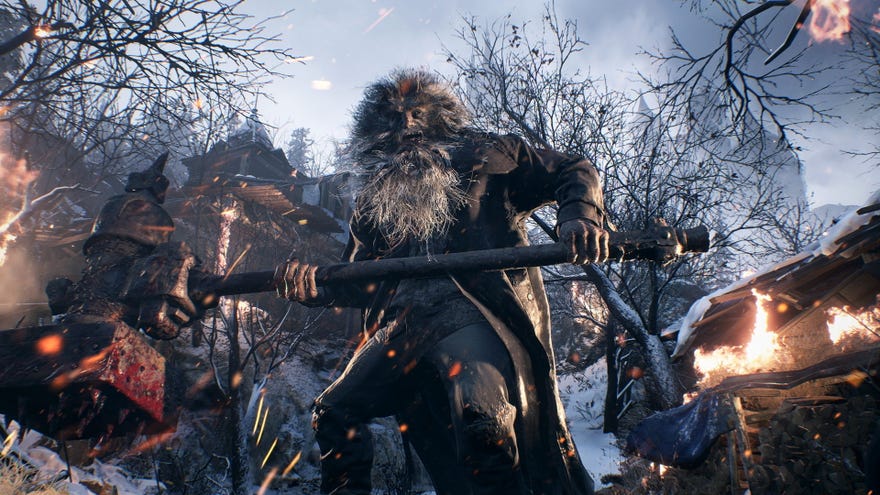
Ray tracing might be the big, hot graphics tech of 2021, but of all theray tracing gamesthat have come to PC so far, only a handful of them have actually blown me away in the old graphics department. I can count the number of games worth buying a ray tracing-capable graphics card for on a single hand - Control,Metro Exodus,Cyberpunk 2077, Minecraft at a push - but the good news is that we can now addResident Evil Villageto that exclusive list, as Capcom’s latest survival horror game really capitalises on its atmospheric lighting to make it one of the best ray tracing games yet.
You can read more about what we thought of the game over in ourResident Evil Village review, and I’ll be putting together a best settings guide to help you get the best performance from Resident Evil Village in time for launch tomorrow. In this article, though, I want to focus on the game’s ray tracing support, showing what it looks like in-game, and what kind of performance you can expect to see across a range of ray tracing-capable graphics cards.
Resident Evil Village: The Village | My Fav Thing In… (Resident Evil Village Gameplay & Review)Watch on YouTube
Resident Evil Village: The Village | My Fav Thing In… (Resident Evil Village Gameplay & Review)

First announcedduring AMD’s RX 6700 XT launch, Resident Evil Village’s ray tracing support is available on both AMD Radeon RX 6000 and Nvidia RTX 20 and RTX 30 graphics cards, and you can turn them on and off from the game’s Display menu. Before we get started, though, here’s a reminder of theminimum and recommended PC requirementsyou’ll need to get ray tracing up and running in Resident Evil Village, as well as what kind of performance Capcom reckons you’ll be able to get from them.
Resident Evil Village ray tracing PC requirements
Rather unhelpfully, Capcom have only listed a couple of 4K performance figures for their recommended ray tracing spec - 45fps and 60fps, with next to nothing about what kind of settings you’ll need to get those figures - but thankfully I’ve gone and filled in the gaps in myperformance analysisbelow.
Resident Evil Village ray tracing: what it looks like
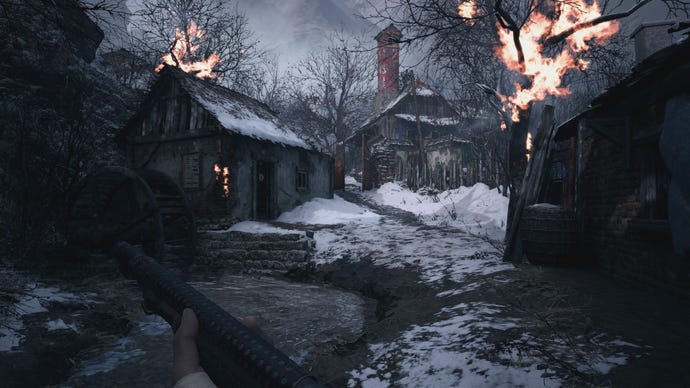
Let’s take a look at what Resident Evil Village’s ray tracing looks like in practice. As you can see from my screenshots below (click to enlarge), switching on ray tracing makes each and every scene look palpably different. Shadows are softer, firelight is warmer, light sources are more accurate, and mirrors, liquids and floors reflect their respective surroundings. It’s one of the first games I’ve played recently where the non-ray traced screens actually look ‘wrong’ compared to their ray traced counterparts, even with all of the settings cranked up to max.
With ray tracing switched off, the shadows in this village scene are all over the shop.
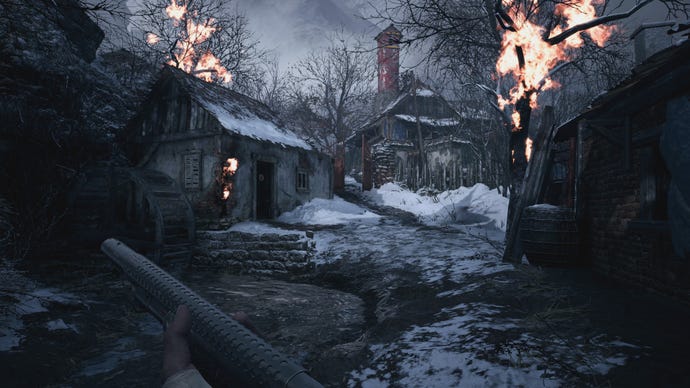
The same scene with ray tracing switched on. Shadows are softened, the firelight gives off a warmer glow, and the water’s edge is now lit properly, too.
A candlelit nook in the village looks oddly cold with ray tracing turned off.
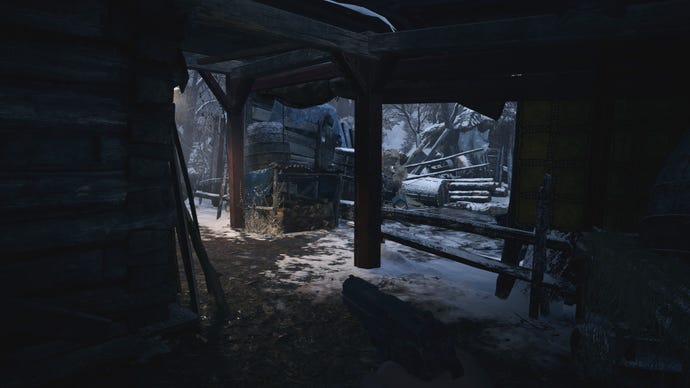
Switch it on, though, and the scene becomes warmer, giving off a more accurate quality of light. The whole Village looks completely different.
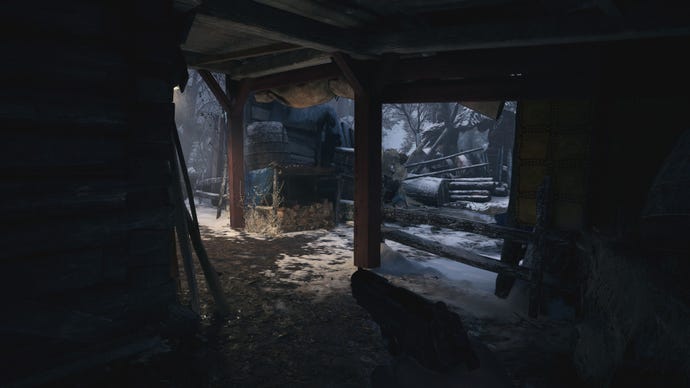
Another example of a scene looking strangely dim and poorly lit without ray tracing switched on.
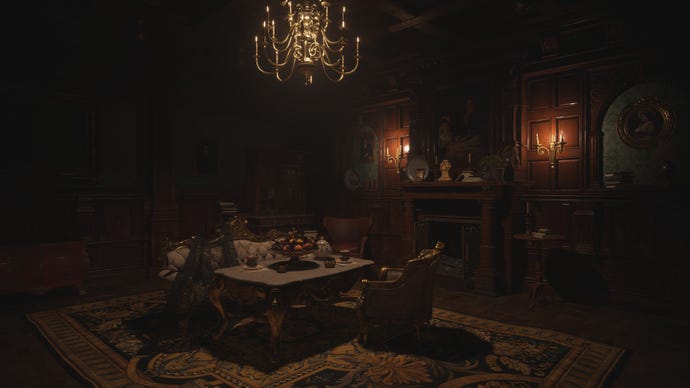
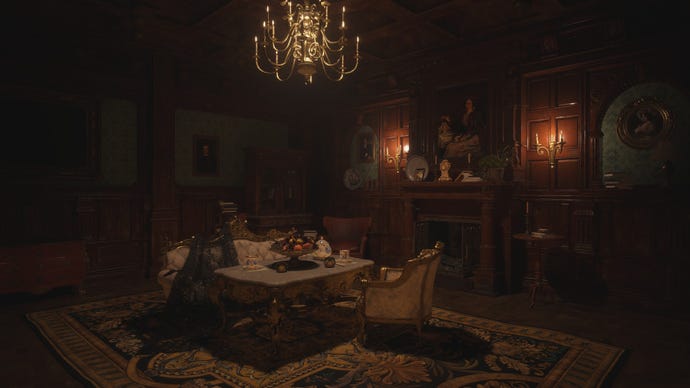
With ray tracing switched on, though, the light from the candles reaches everywhere, creating better reflections on the shiny table legs, a more accurately illuminated ceiling and the correct-looking shadows over in the bookcase on the back wall.
You can really see it when you’re looking at partially opened cupboards and all the nooks and crannies you’ll be exploring throughout the game. Without ray tracing, these shelves are weirdly illuminated, as you can see below. With ray tracing switched on, though, they’re dark, as you’d expect, creating a better sense of contrast with its surrounding objects and enhancing the scene’s overall atmosphere. At long last, the game looks as spooky as it feels, which is exactly what you want to see from these extra tech effects.
Cupboard interiors are actually lit from the inside when ray tracing is switched off.
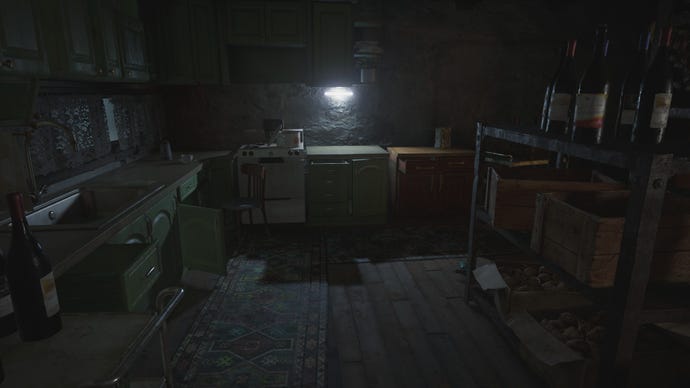
With ray tracing switched on, the scene looks much better.
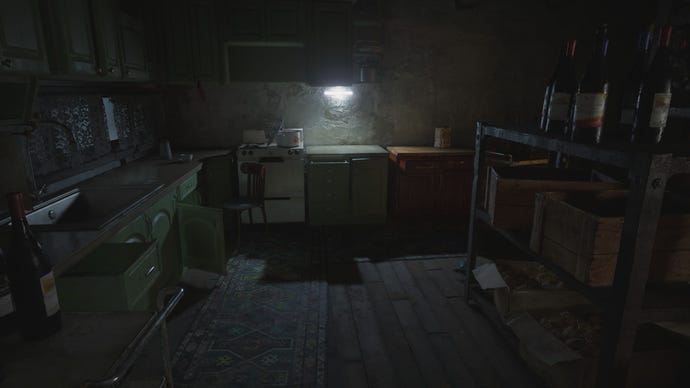
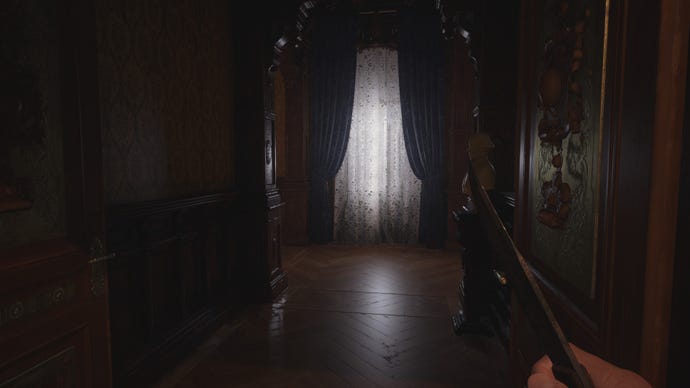
Have a look at this net curtain window, too. With ray tracing switched on, you can really see the sunlight pouring in through the soft mesh material, and how it bounces off the polished wooden floors of Lady Dimitrescu’s castle. Without ray tracing, though, the window looks strangely dim, like there’s barely any light coming from outside at all. There’s a similarly large patch of light shining on the floor directly in front of the window, but it looks disproportionate to what’s coming in from outside.
There’s no way that window is producing that much light on the floor with ray tracing switched off.
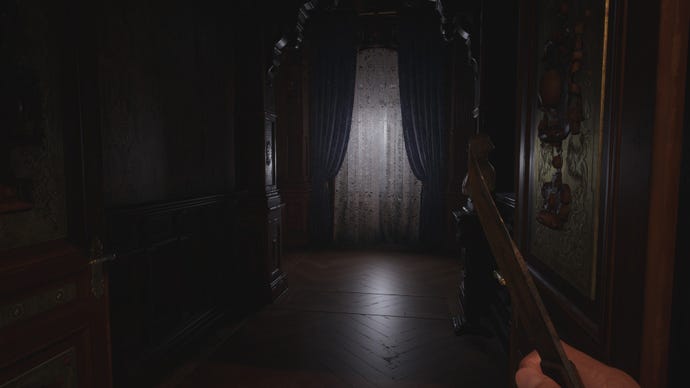
Switch ray tracing on, though, and it makes a big difference.
Resident Evil Village ray tracing performance
Naturally, switching on ray tracing does take quite the toll on your old graphics card, especially when Resident Evil Village doesn’t also have any sneaky frame rate boosting tech like Nvidia’s DLSS gubbins to help keep those performance speeds nice and high. Thankfully, Capcom have designed a pretty reasonable ray tracing quality preset in the game’s Display menu (although I should note that at time of writing, you can’t change preset mid-game - you can only do it when you’re in the main title screen).
I strongly suspect this is what they’ve based their initial 4K performance figures on, as I was able to get both an RTX 2070 Super and RX 6700 XT running at 4K at 45fps without issue. Their minimum Nvidia GPU on the other hand, the RTX 2060, was also perfectly capable of running at a smooth 60fps at 1920x1080, too, which is good news for those with entry-level ray tracing cards.
These are Resident Evil Village’s quality presets. Despite the Ray Tracing setting recommending at least 8GB of VRAM, it actually only uses around 5.5GB at 1920x1080, so the 6GB RTX 2060 is still able to handle it without issue.
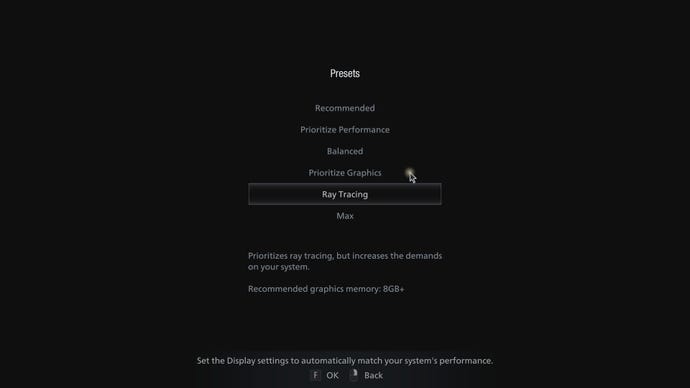
Still, while there’s still plenty of room to bump up the settings further for those of you with higher-end ray tracing capable graphics cards, the good news is that Village’s Ray Tracing preset still provides a good level of graphical fidelity without completely tanking your frame rate. To test Village’s ray tracing performance, I walked Ethan through two big hallways in Castle Dimitrescu - the one with the grand staircase, and its adjoining entrance chamber - noting down each card’s minimum and maximum frame rates.
(I should also note that, at time of writing, changing any graphics settings in-game, even the resolution, nearly always slowed my frame rate right down to a crawl, so all of the figures below are based on loading the game afresh each time. This may change come launch day, but if you need to make any adjustments yourself, I’d recommend exiting to the main title screen just to be on the safe side.)
The one good thing about Resident Evil Village’s graphics settings menu is that it tells you exactly how much VRAM you’re using, and the effect each setting has on your various components. For example, switching on ray tracing (above) will affect your PC’s Processing Load and Lighting Quality.
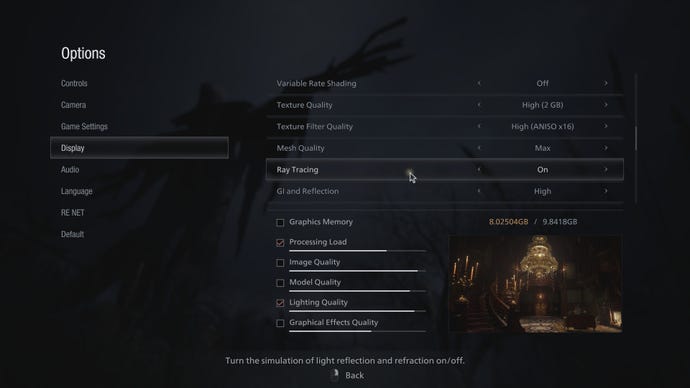
With myRTX 2060, I saw a frame rate range of61-83fpsusing the Ray Tracing preset at 1920x1080, and a still very playable49-66fpsat 2560x1440, too. I wouldn’t recommend going beyond this preset at 1440p, mind, as it was already using 5.7GB out of the card’s usable 5.8GB VRAM banks. Bump the settings up any higher, and you’ll likely suffer from some big performance hitches. Luckily, the Ray Tracing preset only takes up 5.5GB of the RTX 2060’s usable VRAM at 1080p, giving us a teensy bit more leeway to bump up a few settings.
Speaking of which, myRX 6700 XTput in a great performance as well. Obviously, the reason why this card is both Capcom’s minimum and recommended AMD GPU for ray tracing is because AMD haven’t yet released any lower-end ray tracing-capable graphics cards yet, and the RX 6700 XT is much more on par with the RTX 2070 Super (and RTX 3060 Ti / RTX 3070) than the RTX 2060.
Resident Evil Village ray tracing gameplayWatch on YouTube
Resident Evil Village ray tracing gameplay

With this kind of power behind it, it was no surprise that it handled Village’s Ray Tracing preset with ease at 1080p and 1440p, putting in respective frame rate ranges of81-110fpsand72-96fps. It’s also perfectly able to play the game with ray tracing at 4K, too, ranging between39-55fpswith the preset enabled to begin with (and weirdly settling into a much smoother 55-70fps after a few minutes). Add VRS Balanced into the mix as well, and you’re looking at an even smoother 60-75fps.
What’s more, the RX 6700 XT’s 12GB VRAM banks give us plenty of leeway to bump up those other graphics settings, too. At 1080p, 12GB is just enough to crank everything up as far as it can go, including an Image Quality of 2.0 and the top Texture Quality option of High (8GB). With everything maxed out, the RX 6700 XT managed an decent 48-58fps, and an even smoother 51-63fps with VRS Balanced switched on.
(If in doubt, switch on VRS, you won’t regret it).
Alas, you’ll need a ray tracing card with more than 12GB of VRAM to max out all the settings at 1440p (12.57GB, to be precise, and the RX 6700 XT only has a usable amount of 11.95GB, according to the game), but the RX 6700 XT is still capable of delivering smooth frame rates with a few tweaks. Drop the Image Quality to 1.5, for example, and you can still keep everything else maxed out, garnering you a frame rate of 46-60fps at 1440p, and a lovely 50-65fps with VRS Balanced thrown into the mix.
Naturally, increasing the resolution to 4K will take an even bigger toll on your GPU and its VRAM requirements, but it’s still feasible to pump up the default Ray Tracing preset at this resolution, even with an RX 6700 XT. I had to keep the Image Quality set to 1.0, but with Texture Quality set to High 4GB and everything else either set to High or switched on, I still saw a very playable frame rate of 45-63fps with VRS Balanced enabled. That’s pretty good going all things considered, and a very respectable set of figures compared to a lot of other ray tracing games out there at the moment (coughWatch Dogs Legioncough).
Ray tracing off…
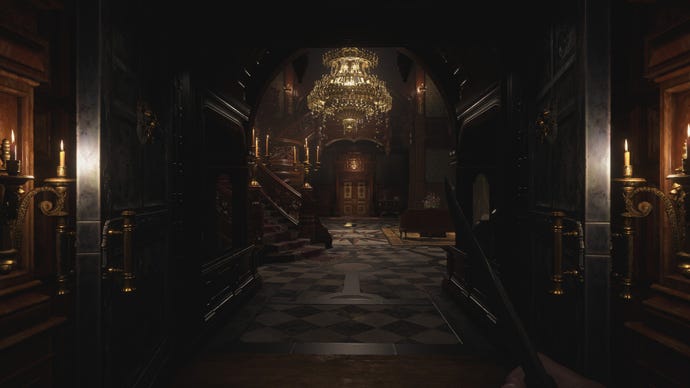
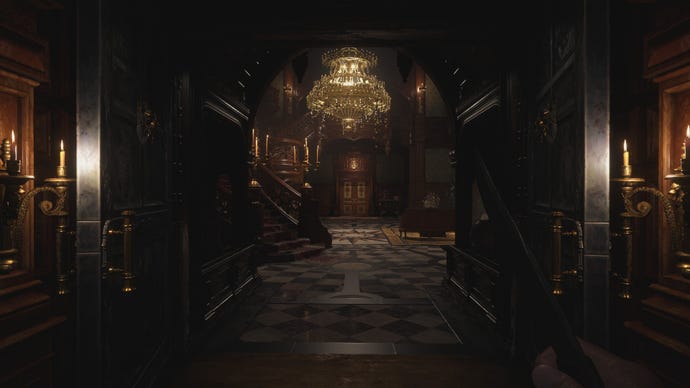
Ray tracing on! Note the differences in the chandelier, reflections on the floor, and the properly illuminated rug going up the stairs.
Of course, since the RTX 2070 Super only has 8GB of VRAM to its name, that gives us less headroom to crank up those graphics settings any further. Indeed, the best I could manage at 1080p with the RTX 2070 Super was a range of 54-70fps with Image Quality set to 1.5 and everything else maxed out, as long as I kept the Texture Quality to High (2GB). Alas, this same set of settings at 1440p only produced 40-54fps (or 46-62fps with VRS Balanced thrown in), so you’ll likely have to lower the Image Quality back down to 1.0 here to maintain a steady frame rate.
If you want to try maxing everything out at 1440p, you’ll probably need at least anRTX 3080 or RX 6800 XTin all honesty, although even these cards struggled to maintain a perfect 60fps at this resolution. Indeed, my RX 6800 XT managed a playable, if slightly choppy 39-50fps with everything dialled up to 11 at 1440p, which rose to 42-55fps with VRS Balanced enabled. The RTX 3080, meanwhile, was mildly better, coming in with 48-61fps (and 52-67fps with VRS switched on), but ultimately it’s still a pretty big ask.
However, the fact that I’m getting anywhere near playable frame rates on max settings with ray tracing switched on at any resolution with these cards is an impressive feat in and of itself. Whereas most other ray tracing games I’ve tested recently have been pretty much unplayable without the aid of something like Nvidia’s DLSS tech to help hoik up the frame rate, Resident Evil Village is a game that not only runs well, but also looks absolutely gorgeous in the process. It’s the dream ray tracing game in my books, and I hope more games follow in its footsteps going forward.
