HomeGuidesMinecraft
Minecraft Fireworks: how to make Fireworks for Elytra flying and firework displaysHow to make Fireworks of any colour, size, and shape
How to make Fireworks of any colour, size, and shape
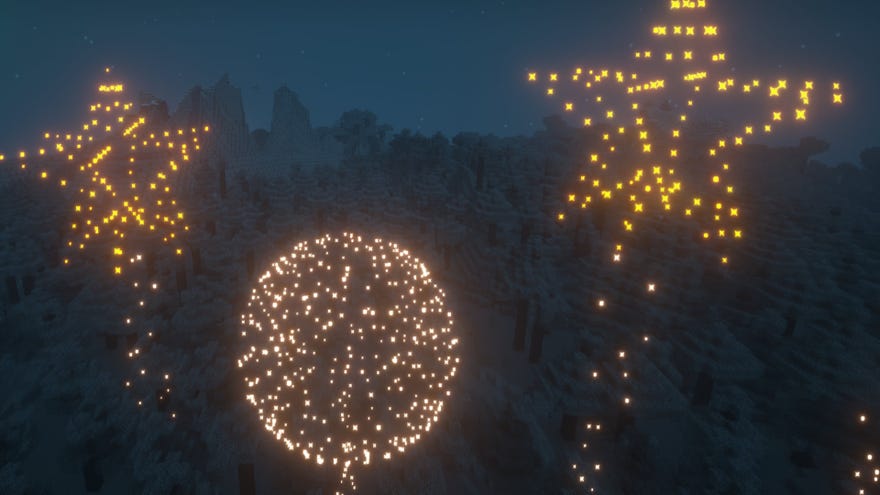
Want to learn how to make Fireworks in Minecraft? There’s actually a surprising amount to learn about making and using Fireworks inMinecraft, because there’s a lot of depth in how you can customise the colours, shapes, and effects of each different Firework. If you want to celebrate finishing a particularly awesometowerorcastle, or even just party for the launch of Minecraft 1.18 (which bringsDripstoneand some beautiful terrain changes), learn how to create your own spectacular Firework displays with ourMinecraft Fireworks guide.
On this page:
The Best Minecraft ShadersWatch on YouTube
The Best Minecraft Shaders

How to make Fireworks in Minecraft
To make a Firework in Minecraft, you need to first make two things: a Firework Rocket, and a Firework Star.
Technically a Firework doesn’tneeda Firework Star - you can launch a simple Firework Rocket into the air and call that a Firework - but without a Firework Star, there’ll be no explosion, no colour, no spectacle. So you really need both Rockets and Stars in order to make Fireworks that explode.
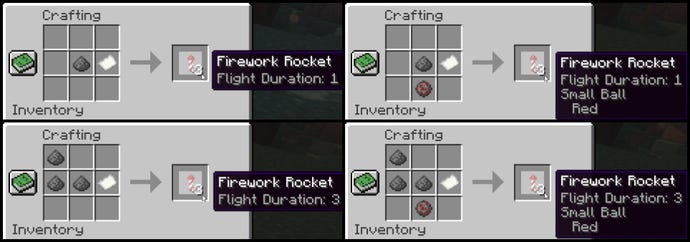
Minecraft Firework Rocket recipe
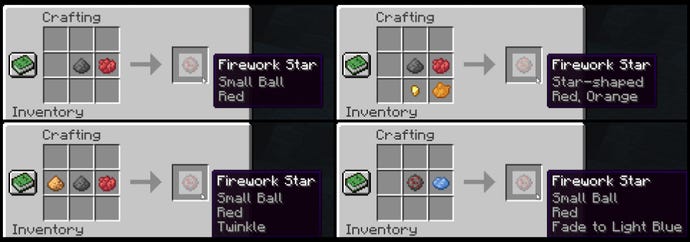
Minecraft Firework Star recipe
Firework Stars are how you customise the explosion of the Firework. Depending on what you use in the recipe, you can change the colours, the shape, the size, and even the after-effects of the explosion.
Here’s how you make a Firework Star:
If you want to make your Fireworks display look as fantastic as possible, check out ourbest Minecraft shaderslist for phenomenal lighting, and ourbest Minecraft seedslist for the most amazing locations for launching fireworks!
Firework Shape Modifier items
Add ONE of the following items to the recipe to change the shape of the Firework explosion:
Note that you can’t mix-and-match with the shape.
Firework Effect Modifier items
Add EITHER OR BOTH of the following items to the recipe to add the following Firework effects:
How to add a Fade Colour to a Firework
After you’ve created your very own Firework Star, you can place the Star back in the crafting window and add up to 8 different dyes to the window. This will add a “fade” colour to the Star, which means all the particles of the initial explosion will fade to the new colours as they disappear.
That’s all there is to creating your own Fireworks in Minecraft. Experiment with different shapes, colours, fades, and durations. You can even place the Fireworks in a Crossbow and fire them that way, or place them in Dispensers hooked up to Redstone contraptions tocreate your very own Fireworks display!
How to use Fireworks for Elytra flying
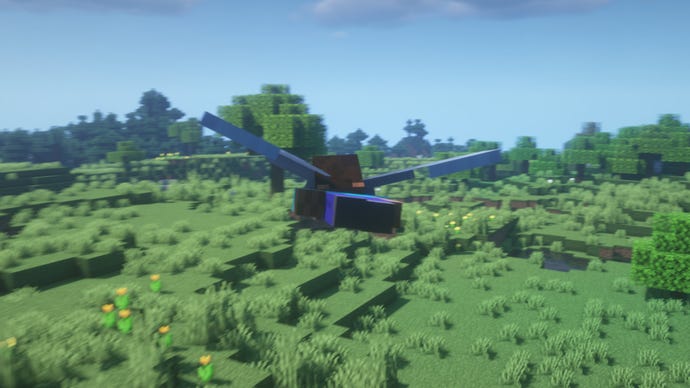
Firework Rockets can also be used to boost yourself while flying with Elytra. To use a Firework to boost yourself while flying, simply right-click with the Firework Rocket and you’ll boost forward in the direction you’re facing.
With Fireworks, you can greatly extend the duration of an Elytra flight, as you’ll gain enough speed with each boost to soar higher up into the air or even take off from a standing start. You’ll be even faster with Elytra than a player usingMinecraft Potionsof Swiftness!
Be warned though:if you use a Firework Rocket that was made with a Firework Star, then it will explode on you when you use it to boost, and you’ll take damage. So it’s best to use plain Firework Rockets (just Gunpowder and Paper, no Firework Star) if you want to use Fireworks for boosting with Elytra.
That’s everything you need to know about Fireworks in Minecraft covered. If you’re looking to share your fireworks prowess with others, check out our list of thebest Minecraft serversfor playing with friends. Alternatively if you want a building project to go alongside your fireworks display, gain some inspiration with ourMinecraft house ideasandMinecraft build ideas. And if you’re looking for the easiest possible way to create fireworks, check out ourMinecraft commandslist.
