HomeHardwareNews
Microsoft are bringing the Xbox Series X’s Auto HDR feature to PCAvailable now with the latest Windows Insider build
Available now with the latest Windows Insider build

Microsoft are bringing their Auto HDR feature to PC, allowing HDR-capable gaming monitors to play games in high dynamic range even if they don’t have native support for it. First seen on theXbox Series Xand S when Microsoft’s next-gen consoles launched last November, the new Auto HDR Preview mode for PC works with thousands of DirectX 11 and DirectX 12 PC titles and can be toggled on and off in Windows 10’s settings menu.
Microsoft have a full breakdown of how to get it working on an HDR-capable PC over on theirdev blogright now if you want to try it out for yourself, although you’ll need to join the dev channel of their Windows Insider Program in order to unlock the feature in Windows' HR Colour settings menu. They also recommend you have an HDR certified gaming monitor (one that has a VESA DisplayHDR certification, for example) rather than one that’s simply ‘HDR ready’.
Xbox Series X: Auto HDR Mode Tested - What Works and What Doesn’tWatch on YouTube
Xbox Series X: Auto HDR Mode Tested - What Works and What Doesn’t

Microsoft say they haven’t enabled Auto HDR oneverytop DirectX 11 and 12 game just yet - apparently some are harder to identify as being eligible for Auto HDR - but they’re confident that it shouldn’t impact your PC’s overall gaming performance too much once it’s been enabled. They also acknowledge that they think “turning on HDR just for gaming is harder than it should be” at the moment (too right, I say), so I’m hopeful that if nothing else comes out of this preview process, it’s that Microsoft finally sort out the current mess that is Windows 10 HDR support.
Naturally, Auto HDR won’t suddenly turn your DisplayHDR 400 monitor into an all-singing, all-dancing HDR megascreen, but it should (hopefully) at least make in-game colours a bit more vivid, even if it can’t do a lot with your monitor’s brightness levels. Provided you’ve got good enough hardware, though, here’s a heatmap of Auto HDR running inGears 5compared to how it runs in SDR and Native HDR.
A luminance heatmap showing SDR, Auto HDR and Native HDR running in Gears 5
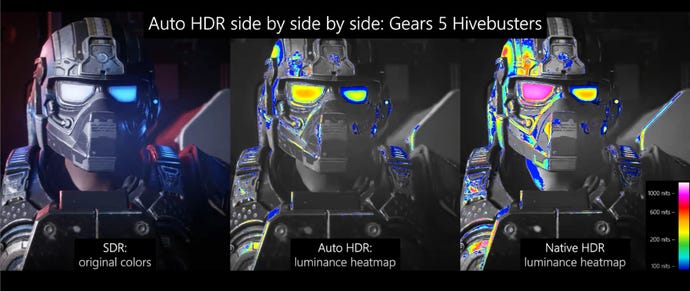
Gears 5 already has pretty excellent Native HDR support, but you can see from what’s going on in beef man’s googles, helmet and armour that you’re already getting much brighter highlights over the SDR version. In any case, I’m looking forward to trying it out once I get my next HDR monitor in for testing, so stay tuned for some more impressions at a later date.
