HomeHardwareFeatures
Mass Effect Legendary Edition’s PC settings are missing all but the most basic optionsLess than legendary
Less than legendary
Bioware have taken great pains to show off all the swankynew visual enhancementscoming to their remasteredMass Effect Legendary Editiontomorrow, including support for 4K resolutions, ultrawide monitors, revamped lighting, sharper textures and loads more. The difference is plain to see in screenshots and theirbefore and after comparison video, but in terms of being able to fiddle around with those settings yourself in the game’s PC settings menu… well, what’s the equivalent of an intergalactic tumbleweed?
There’s just… not much there. Open up the Graphics menu in the Settings tab and this is all you get forMass Effect1:
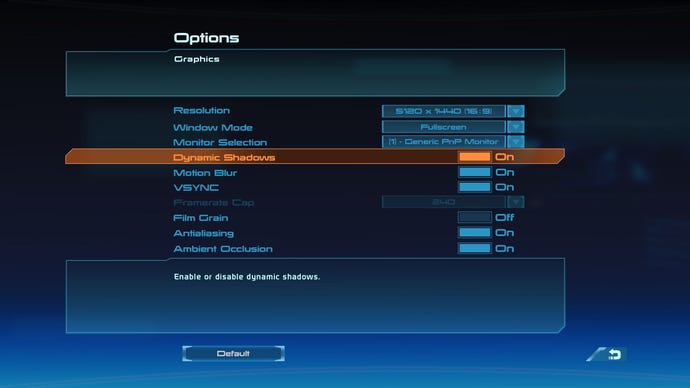
That’s it. No quality sliders, no graphics presets, no resolution scalers… Nothing. Just six On / Off settings (one of which is your standard V-Sync toggle), and some basic resolution options.
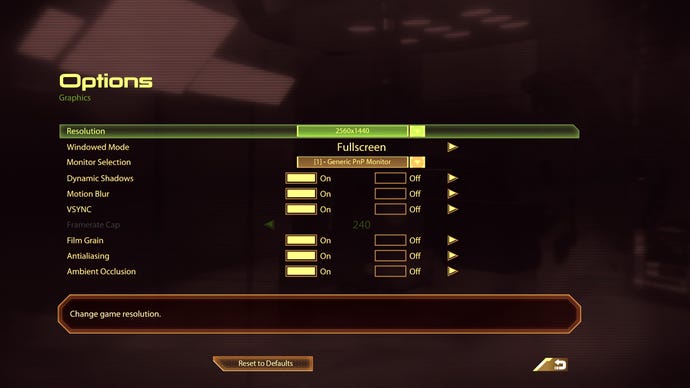
It’s the same forMass Effect 2and 3 as well, as you can see below.
Mass Effect 2 has the same set of PC settings as Mass Effect 1.
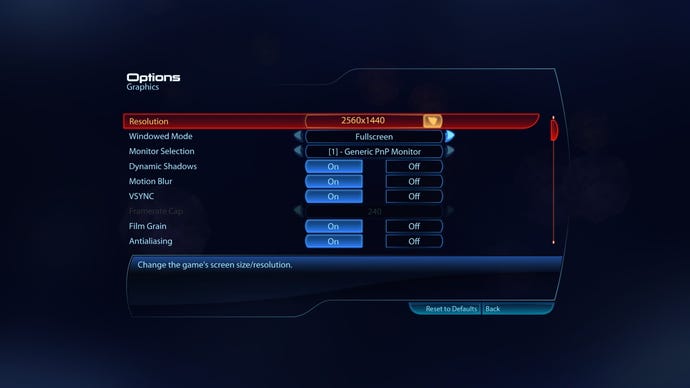
As does Mass Effect 3 (ambient occlusion is also included, but for some reason they couldn’t fit it all on one screen for the third game, which is baffling considering how few options there are in the first place).
It’s disappointing, to say the least, and I was hoping the PC version would have something a little more comprehensive given how many effects Bioware have been talking up in the run-up to the game’s release. Heck, even console players get the option of “Favour Quality” and “Favour Frame Rate” in their settings menu, and it’s a shame there isn’t something similar for us for PC. Indeed, given how much work the developers have put into making everything 4K for the Legendary Edition release, even something like a simple resolution scaler would have been a welcome addition here, as this would allow those playing on 1080p, or even 1440p monitors to still get the benefit of those lovely, crisp new assets without having to hook up their PCs to a native 4K display.
There are, at least, some important basics here. The Motion Blur toggle will be good news for those who suffer from motion sickness when they’re moving the camera quickly, and the option to cap the frame rate at various intervals, including 30fps if your PC is struggling or a maximum of 240fps if you’ve got a high refresh rate monitor is also very welcome. Anti-aliasing is another important one for helping to smooth out any jagged edges, too, which can be surprisingly prevalent in older games due to their less detailed character models - and Mass Effect’s Legendary Edition is no exception. When I turned it off to see what the difference was, there were jaggies aplenty at 1080p and 1440p, and even playing the game at 4K had its fair share of them, too. As such, I’d definitely keep AA turned on.
Mass Effect Legendary Edition – Official Remastered Comparison Trailer (4K)Watch on YouTube
Mass Effect Legendary Edition – Official Remastered Comparison Trailer (4K)
Apart from these basics, though, the only vaguely fancy things you get to control are the Dynamic Shadows and Ambient Occlusion. The former adds in effects like giving your party accurate shadow silhouettes on the ground when you’re moving around, while the latter is all to do with soft lighting. Ambient Occlusion can often help to make scenes look more realistic, but when I switched it on and off in-game, I struggled to see much of an improvement.
In Mass Effect Legendary Edition’s defence, it does actually run supremely well even on ancient hardware, so perhaps Bioware simply didn’t feel the need to go all-out on extraneous PC settings. Take a look at the game’s PC requirements, for example, and you’ll immediately see that they’re pretty tame. As you can see below, the minimum requirements list graphics cards that stretch all the way back to the heady days of 2013, so if you built your PC within the last decade or so, you should still be able to run it. The game’s recommended requirements should also be pretty feasible for PCs built within the last five years, too. Bioware don’t state what kind of performance you can expect to see from either of these specifications, but they do say that you’ll be able to launch it with “no calibrations necessary” - which is technically true, given that there isn’t actually anything to calibrate in the PC settings menu.
Ultimately, I think my disappointment stems more from the fact that we just can’t go to town with with Mass Effect’s PC settings here, and make it look as ‘legendary’ as its remastered subtitle implies. After all, part of the reason why a lot of us play on PC in the first place rather than on console is so we can really push the boat out on games like this, precisely because of our more powerful hardware. Alas, Mass Effect Legendary Edition appears to be very much a ‘one size fits all’ kind of remaster. Bioware have put a lot of work into making all three games look as new and shiny as they do, but at the same time I can’t help but feel like the PC version in particular could have been shown a little bit more love.
