HomeGuidesHonkai: Star Rail
How to Superimpose Light Cones in Honkai: Star RailAnd what to do when you see “Item Locked” on a 4-star or 5-star Light Cone
And what to do when you see “Item Locked” on a 4-star or 5-star Light Cone
Image credit:HoYoverse / Rock Paper Shotgun
Image credit:HoYoverse / Rock Paper Shotgun
How do I unlock 4-star Light Cones to Superimpose in Honkai: Star Rail?While every character inHonkai: Star Railcarries a unique cosmetic weapon that they wield impressively as part of their combat animations, Light Cones are theactualweapons in the game from a mechanical perspective. These are the items that you, the player, can equip to a character to influence their combat stats and buffs, and therefore it’s Light Cones you need to think about when putting together a character build.
Light Cones can be enhanced in a couple of ways, includingSuperimposingthem together. This is a brand-new system that even experienced HoYoverse players haven’t seen before, and therefore benefits from an extra explainer. Read on for everything you need to know about Superimposing Light Cones in HSR, including how to unlock higher-rarity items for Superimposition.
Honkai: Star Rail - How Does It Compare To Genshin Impact?Rebecca chatted to Liam about how Honkai: Star Rail stacks up against Genshin Impact.Watch on YouTube
Honkai: Star Rail - How Does It Compare To Genshin Impact?
How to Superimpose Light Cones in Honkai: Star Rail
Superimposing two Light Cones inHonkai: Star Railis reasonably simple. On the character screen, select Light Cone from the list on the left-hand side. From here you’ll see options in the lower right-hand corner to either “Switch” or “Enhance” the active character’s Light Cone. Choose “Enhance”.
Manage characters' Light Cones from a tab on the Character screen.From here you can switch or enhance the active character’s Light Cone.Image credit:HoYoverse / Rock Paper Shotgun
Manage characters' Light Cones from a tab on the Character screen.
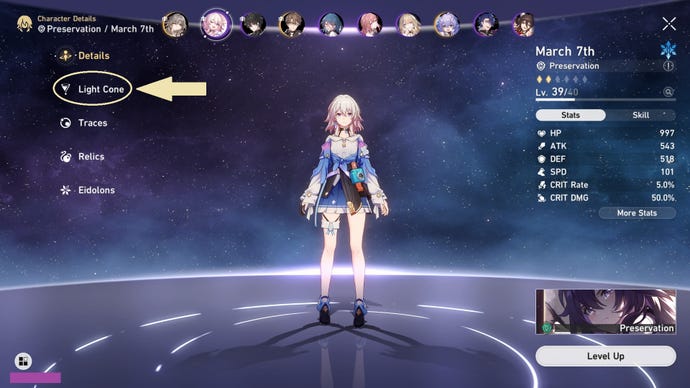
From here you can switch or enhance the active character’s Light Cone.
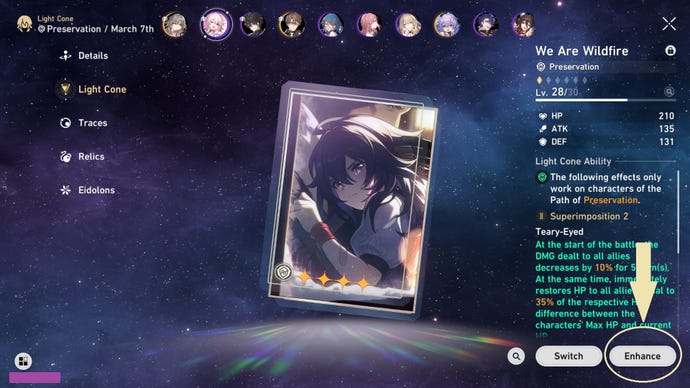
Ignore the Level Up tab if you want to Superimpose!
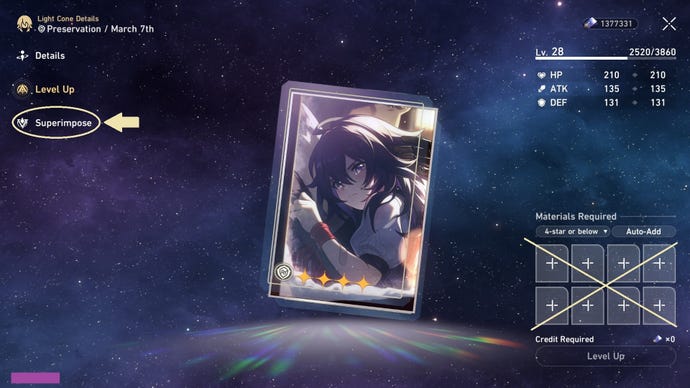
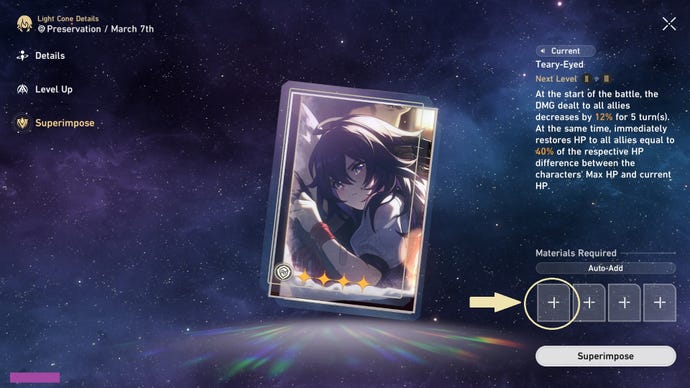
In the lower right-hand corner of the screen you can now add materials, which in this case means dropping in duplicate Light Cones to Superimpose them with the currently selected one. Just be aware that clicking the “Superimpose” button underneath will immediately consume any materials in the boxes, and you can’t undo it once it’s done!
How to unlock 4-star Light Cones to Superimpose
A rare Light Cone locked…… and unlocked.Image credit:HoYoverse / Rock Paper Shotgun
A rare Light Cone locked…
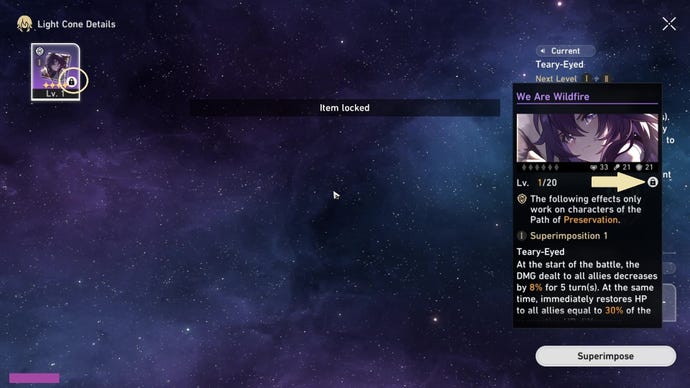
… and unlocked.
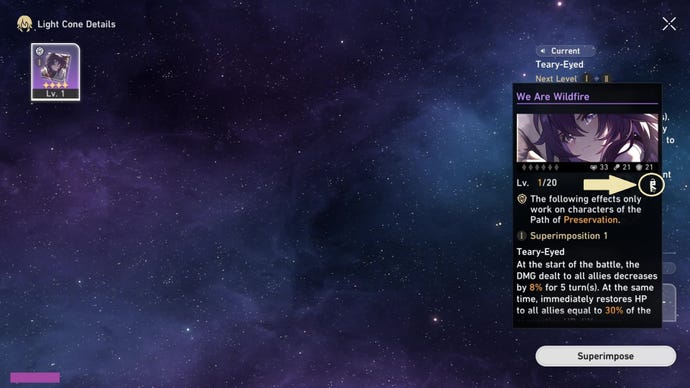
What is Superimposing in Honkai: Star Rail?
Because HSR is a gacha game, you’re probably going to end up with a lot of duplicate Light Cones, particularly those at a 3-star rarity which account for roughly 90% of your loot box drops. Like older HoYoverse games, Honkai: Star Rail allows you to sacrifice some of those ubiquitous duplicates to improve the Light Cones you want to keep, but with a twist! Instead of simply breaking them down for levelling materials (though you do still have this option as well), HSR allows you to Superimpose duplicate Light Cones together, granting unique effect multipliers.
When you Superimpose two Light Cones together they permanently merge into one item, and the sacrificed Light Cone boosts the unique effect stats of the one you keep. Unlike breaking duplicates down for levelling materials, only multiple versions of the same Light Cone can be Superimposed together, and you’re limited to four Superimpositions onto each base item.
Each Light Cone has its own Superimposition benefits, but here’s a representative example of the before-and-after effects of Superimposition. These are the effects of Superimposing the 3-star Pioneering Light Cone for Preservation characters, which I have pulled from the gacha approximately a dozen times this month:
Is Superimposing Light Cones worth it?
If I may editorialise for a moment, I’m quite a fan of the Superimpose mechanic in Honkai: Star Rail. It’s a particular boon for F2P players like myself, since a fully Superimposed 3-star Light Cone is relatively simple to obtain, but can easily boast better stats than a 4-star Light Cone with no Superimpositions.
However, Superimposing high-rarity Light Cones is less desirable: you’re not likely to have many more of them than you have characters to equip them on, so it’s a big commitment to consume one in order to beef up another. It’s probably worth doing if you’re lucky enough to get duplicates of the perfect 4-star Light Cone for your main, but otherwise might be better left alone for higher-rarity items.
For more Honkai: Star Rail guides, be sure to check out our pageexplaining the Honkai: Star Rail pity system, and ourHonkai: Star Rail codes list!
