HomeGuidesStarfield
How to rename your Starfield shipFollow these steps to change the name of any ship you own in Starfield
Follow these steps to change the name of any ship you own in Starfield
Image credit:Rock Paper Shotgun/Bethesda Game Studios
Image credit:Rock Paper Shotgun/Bethesda Game Studios

How do you rename your ship in Starfield?When Bethesda create a massive space-basedRPG, they certainly don’t skimp on the ship customization.Starfieldgives you the tools early on to build just about any ship you can imagine. But what if you want to put your own stamp on it and give it a custom name?
It is indeed possible to renameall ships in Starfield- but Bethesda have done a good job of hiding the option behind layers of menus. In this quick no-nonsense guide we’ll walk you throughhow to change your ship name in Starfield.
To see this content please enable targeting cookies.Manage cookie settingsWas Starfield worth the wait? Liam and Alice B discuss this question - and more - in the video above.Watch on YouTube
To see this content please enable targeting cookies.Manage cookie settings
To see this content please enable targeting cookies.Manage cookie settings
How to rename your ship in Starfield
To rename your ship in Starfield you must speak to a Ship Technician and ask to view and modify your ships. Then click on “Ship Builder”, click “Flight Check” and finally “Rename”.This will allow you to give your ship a new name up to 14 characters long.
You can find Ship Technicians on various major settlements inStarfield, but the easiest (and first) one you’ll come across is right next to the Trade Authority Kiosk on the landing pad in New Atlantis.
Ship Technicians can also help you if you want tosell your shiporupgrade your ship. If you’re thinking your ship could do with a new lick of paint, have a look at our list of thebest ship designs in Starfieldfor some inspiration. If you just need to rename your ship, then here’s what you need to do it.
Step 1: Talk to a Ship Technician and ask to see your ships. |Image credit:Rock Paper Shotgun/Bethesda Game Studios

To rename your ship, speak to the Ship Technician and select the “I’d like to view and modify my ships” dialogue option. This will bring you to the ship overview screen, where you can use the button prompts at the top to cycle between the ships in your possession.
Step 2: Open the Ship Builder. |Image credit:Rock Paper Shotgun/Bethesda Game Studios
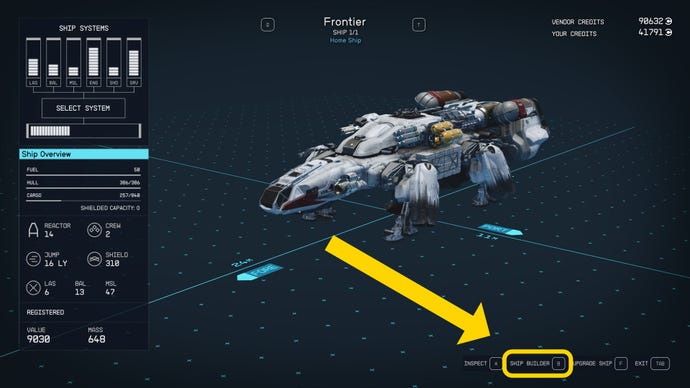
Then press the Flight Check button in the bottom-right corner to prompt a Flight Check which tells you whetheryour shipis ready to launch. However, it also adds a new button to the command bar at the bottom of the screen: “Rename Ship”.
Step 3: Perform a Flight Check. |Image credit:Rock Paper Shotgun/Bethesda Game Studios
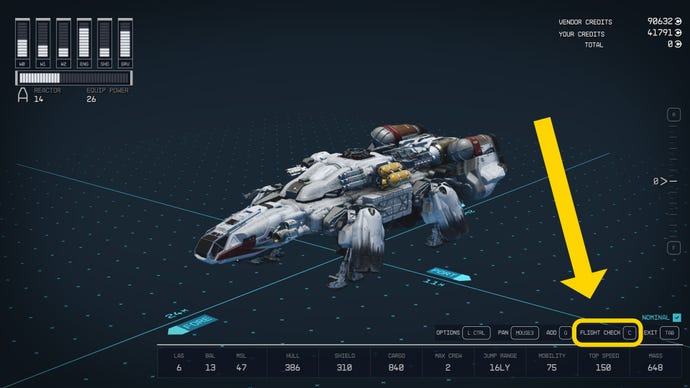
Once the name of the ship is shown in the centre of the screen, press the “Rename” button to change it. Type in your new ship name, and hit confirm. Then exit out of the Ship Builder and the dialogue with the Ship Technician. Voila! You’ve just renamed your ship.
Step 4: Click the Rename Ship button. |Image credit:Rock Paper Shotgun/Bethesda Game Studios
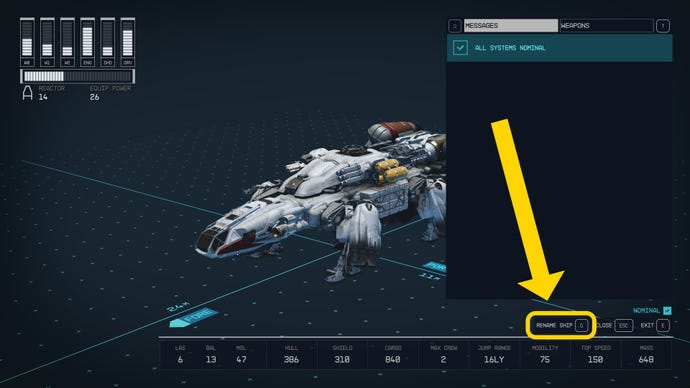
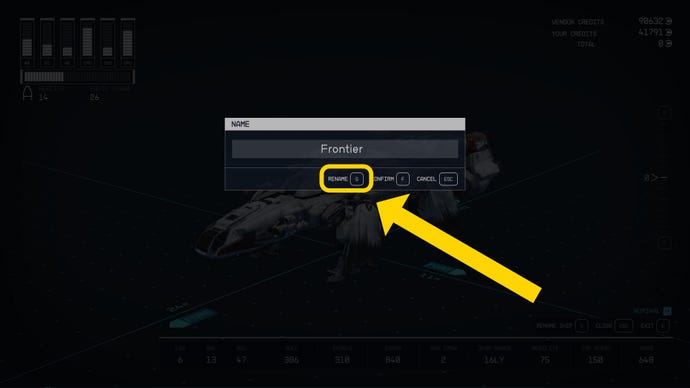
That’s all you need to do to change your ship’s name in Starfield. While you’re in the area, why not take a look at our guides on thebest Starfield shipsand how to accessStarfield ship storage? Or you can consult our guides on thebest Starfield skillsandbest Starfield builds, so your newly renamed ship has a worthy captain. We’ve also got handy guides onwhere to sell contrabandand theStarfield romance options.
