HomeHardwareFeaturesDeathloop
FSR 2.0 tested: AMD’s new upscaler closes the gap on DLSSDeathloop shows FidelityFX Super Resolution 2.0 looks better and can perform better too
Deathloop shows FidelityFX Super Resolution 2.0 looks better and can perform better too
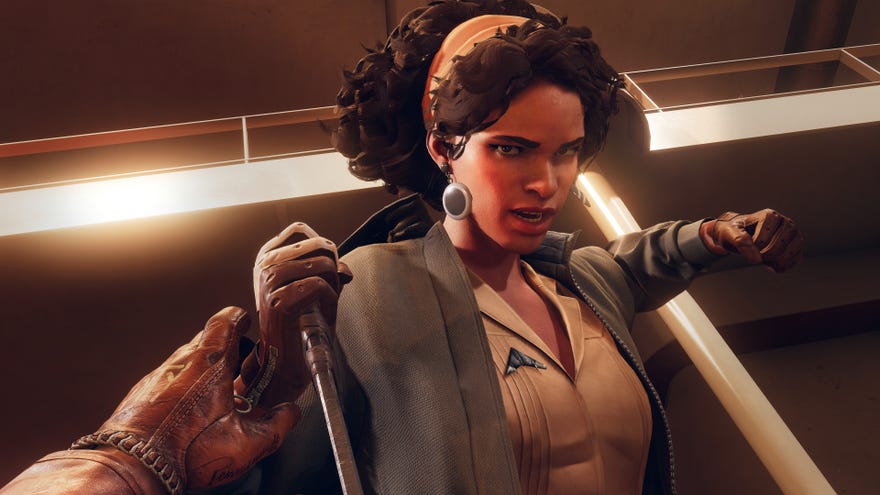
AMD’sFSR 2.0upscaler is out now – in only one game,Deathloop, but still. This is a big moment for the heavily upgraded FSR (FidelityFX Super Resolution), as it’s basically attempting to fight Nvidia’s rivalDLSS(Deep Learning Super Sampling) with some of its own tactics. There’s none of Nvidia’s machine learning enhancements, but whereas FSR 1.0 was a simple spatial upscaler – meaning data used for upscaling a frame could only come from within the frame itself – FSR 2.0 uses a temporal upscaling technique similar to that of DLSS. This allows it to draw data from previous frames as well, producing a sharper, higher-quality image.
The lack of machine learning also has the upside of keeping FSR 2.0, like FSR 1.0, compatible withanyreasonably recent gaming GPU. Nvidia may make most of this generation’sbest graphics cards, but you won’t need something brand new and super powerful to let FSR 2.0 boost your frame rates. To find out how well it works, compared to both DLSS and FSR 1.0, I reinstalled Deathloop and gave all three upscalers a whirl.
Top 10 New PC Games For May 2022Watch on YouTube
Top 10 New PC Games For May 2022

FSR 2.0 tested: Deathloop 4K performance
I tested Deathloop’s upscalers on anRTX 3070GPU, matched with anIntel Core i5-1600Kand 16GB of RAM. Before we get into FPS gubbins, though, let’s take a look at how FSR 2.0 improves on 1.0’s general visual quality.
1of7CaptionAttribution
1of7
1of7
1of7
CaptionAttribution







CaptionAttribution
Caption
Attribution
Just fyi, “Quality” is the highest possible setting for both FSR 2.0 and DLSS; with FSR 1.0, “Quality” is in fact the second-highest, with “Ultra Quality” being the best. “Balanced” is the second-highest for FSR 2.0 and DLSS, making it the equivalent of “Quality” on FSR 1.0. Not confusing at all.
Left: FSR 2.0 on Quality. Right: FSR 1.0 on Ultra Quality
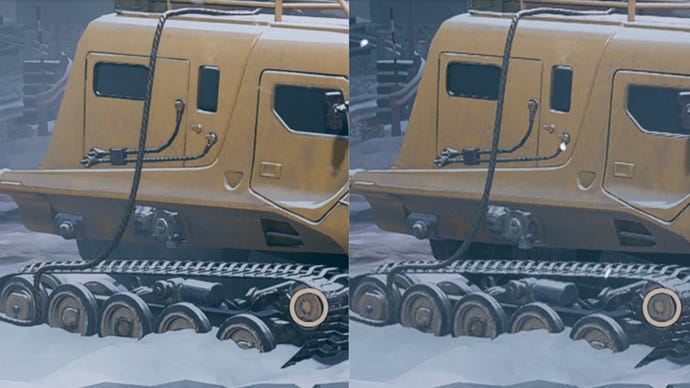
Mea culpa time: I previously said FSR 2.0 inherits whichever anti-aliasing the game has enabled before upscaling (as opposed to DLSS, which includes its own AA). I was wrong! FSR 2.0 actually includes its own form of temporal anti-aliasing (TAA). For the native-setting screenshots here I used Deathloop’s own TAA setting, but in theory FSR 2.0 version should be better as the image is being reconstructed using more data from previous frames.
Left: FSR 2.0 on Quality. Right. DLSS on Quality
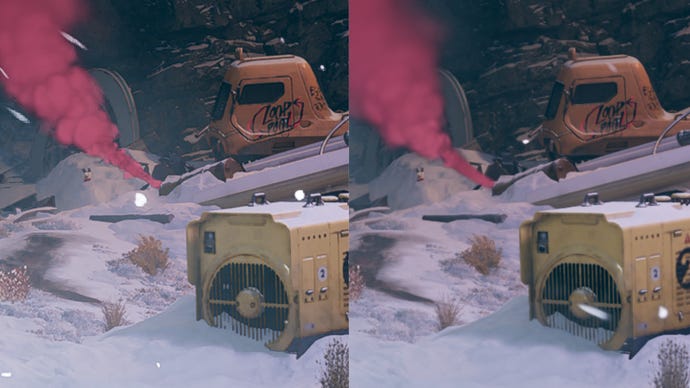
An improvement on FSR 1.0 means that FSR 2.0 comes much closer to DLSS on fidelity… just not quite enough to surpass it. In fairness, the difference isn’t often as noticeable as when we zoom in this closely, but you can tell from distant details (like that oil drum and the thin metal grates on the generator) that Nvidia’s tech remains slightly superior. Even if you do need a GeForce RTX card specifically to use it.
In motion, I also noticed less shimmering on objects like staircases and vehicle tracks than I did on FSR 2.0, and that red smoke cloud speaks for itself. It’s weirdly pixelated with FSR 2.0, while DLSS maintains a more natural look.
Left: FSR 2.0 on Quality. Right: native 4K
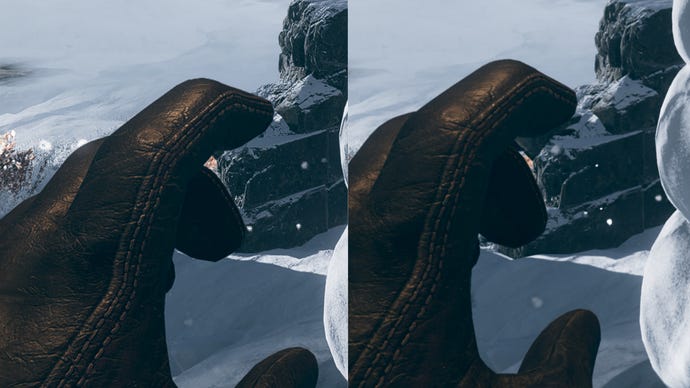
Still, at least FSR 2.0 can join DLSS in the Better Than Native club. Compared to rendering straight to 4K, FSR 2.0 seems to enhance sharpness and even texture detail. In the comparison above, you can see how the leather and stitching on Colt’s glove, as well as the decaying brick wall, appear just that little bit sharper with FSR 2.0 on its Quality setting.
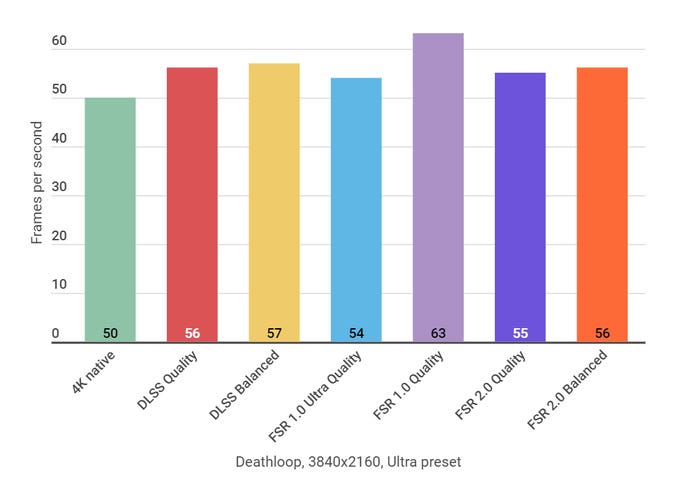
At 4K, Deathloop’s performance gains from upscaling are unusually modest. FSR 1.0’s Quality setting is the fastest of the bunch, though using the higher-quality FSR 2.0 or DLSS options only added around 10% more FPS than native 4K. On the positive side, AMD card owners will be relieved that the newer version of FSR doesn’t run significantly slower than DLSS, and there’s also some reassurance in knowing that you can select the Quality option and still get near-identical performance to the Balanced option. It’s even with FSR 1.0’s equivalent Ultra Quality setting too, so the visual upgrade doesn’t necessarily come with a performance cost.
FSR 2.0 tested: Deathloop 1440p performance
So far, you could never call FSR 2.0 a DLSS killer, but it’s a decent enough step forward at 4K. At the more widely used 1440p, I’d say it’s even better, particularly when compared its predecessor.
1of7CaptionAttribution
1of7
1of7
1of7
CaptionAttribution







CaptionAttribution
Caption
Attribution
Check out the whatever-the-hell-vehicle-this-is below; almost everything about it, from the aliasing around the door edges to the detailing on the tracks and even the matte texture of the bodywork, looks better with FSR 2.0. The only reason it looks a bit hazier is due to a passing gust of snowy air.
Left: FSR 2.0 on Quality. Right: FSR 1.0 on Ultra Quality
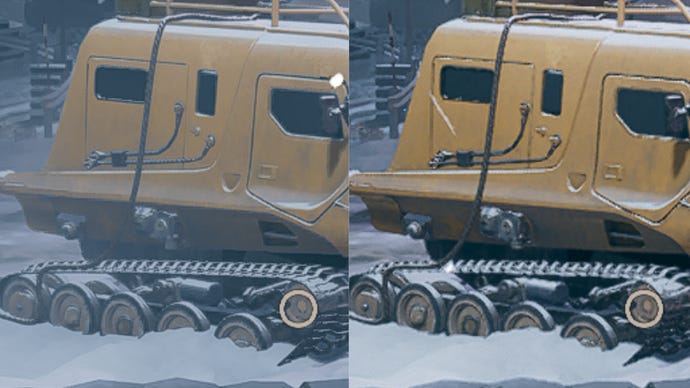
You can also see how the brick wall, which is closer to the camera, has much more defined edges.
Left: FSR 2.0 on Quality. Right. DLSS on Quality
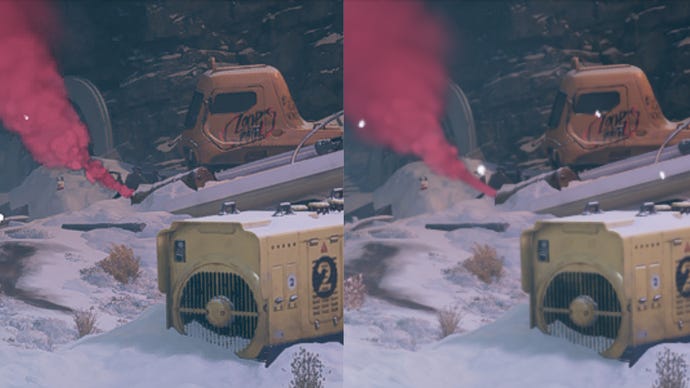
FSR 2.0 still has a pixelly smoke problem at 1440p, and again DLSS’s Quality setting generally enhances Deathloop slightly more. To its credit, FSR 2.0 can actually look even sharper than Quality-level DLSS in certain places – check out the graffiti on the yellow truck – but it’s a harsher, more artificial kind of sharpness.
Left: FSR 2.0 on Quality. Right: native 1440p
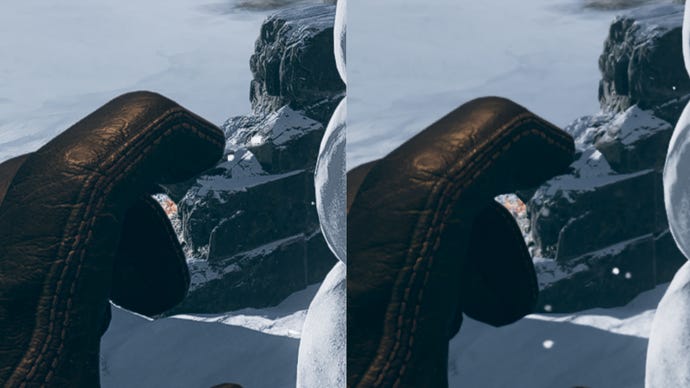
Ah well. FSR 2.0 still manages to look even better than native at 1440p – or at the very least, sharper. Again it performs its texture-polishing trick on Colt’s gloves, while farther details gain a touch of extra crispness. Then, of course, there’s the performance bonus…
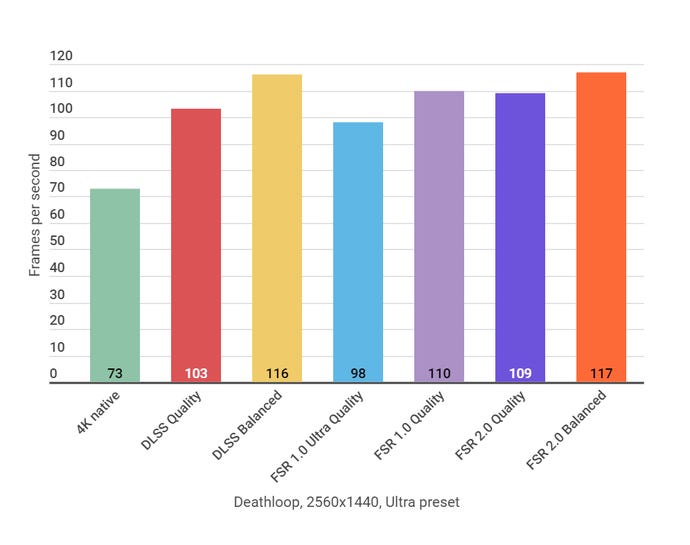
Interestingly, ye olde FSR 1.0 is the worst-performing Deathloop upscaler at 1440p, despite speeding ahead at 4K. What’s more, FSR 2.0 takes its place, edging ahead of DLSS for both their Quality and Balanced settings.
Given how DLSS still looks a little nicer, I’d say that’s still the one to go with if you already own a GeForce RTX GPU. Which, no disrespect to AMD, shouldn’t be a very surprising outcome: RTX cards have machine learning hardware included for the very purpose of making DLSS the ideal upscaler.
However, that’s not to say FSR 2.0 is a failure. Even if it can’t take advantage of dedicated hardware, it’s managed to close the quality gap on DLSS significantly, while keeping its platform agnostic quality and even beating the simpler, less intensive FSR 1.0 at 1440p performance. It’s a much-improved bit of resolution trickery, and whenever DLSS isn’t available, I for one won’t mind finding it in a game’s graphics settings instead. Once more than one game starts supporting it, anyway.
