HomeGuidesCyberpunk 2077
Cyberpunk 2077: how to holster your weaponHere’s how to put your gun away.
Here’s how to put your gun away.
You won’t want to be walking around Night City with your weapon drawn all the time inCyberpunk 2077. Problem is, the game doesn’t really explainhow to holster your weapon. So we’ve decided to explain how to do so in this guide. We’ll take a look at holstering your gun on PC, so that you can be a little less threatening to those around you.In this Cyberpunk 2077 guide:How to holster weapons on PCHow to holster on Xbox and PlayStationWhy holster your weapon?How to holster your weapon in Cyberpunk 2077To holster your weapon inCyberpunk 2077you’ll need to hold down the ALT key to bring up the quick-select menu. From here, you can select the red gun icon. This will holster any weapon you are holding. You can see this menu in the screenshot below. There’s also the option to double tap ALT, which will holster weapons faster. For a detailed explanation of the three main weapon types, head to ourCyberpunk 2077 weapons guide.Putting your gun away on Xbox and PlayStationFor our friends over on the console side of things, just press and hold Y/triangle to bring up the quick-select menu. Press A/X to select the red gun icon. This will put your gun away on consoles. You can also double tap A/X.Cd Projekt Red Are Making A New Witcher Trilogy, A Sequel To Cyberpunk 2077 & MoreCD Projekt Red recently announced that they’re working on a new Witcher trilogy as well as a sequel to Cyberpunk 2077.Watch on YouTubeWhy holster your weapon?Having a weapon drawn in Cyberpunk 2077 can make characters around you slightly nervous. There’s no real downside to this, except you might get some obscenities thrown your way now and again. I mostly put weapons away to free up the screen a bit, making it easier to see loot and conversation options.That’s how to put your weapons away in Cyberpunk 2077. For more on the game be sure to check out ourfull soundtrack breakdown. Elsewhere there’s our look atthe characters that you can romance.
You won’t want to be walking around Night City with your weapon drawn all the time inCyberpunk 2077. Problem is, the game doesn’t really explainhow to holster your weapon. So we’ve decided to explain how to do so in this guide. We’ll take a look at holstering your gun on PC, so that you can be a little less threatening to those around you.In this Cyberpunk 2077 guide:How to holster weapons on PCHow to holster on Xbox and PlayStationWhy holster your weapon?How to holster your weapon in Cyberpunk 2077To holster your weapon inCyberpunk 2077you’ll need to hold down the ALT key to bring up the quick-select menu. From here, you can select the red gun icon. This will holster any weapon you are holding. You can see this menu in the screenshot below. There’s also the option to double tap ALT, which will holster weapons faster. For a detailed explanation of the three main weapon types, head to ourCyberpunk 2077 weapons guide.Putting your gun away on Xbox and PlayStationFor our friends over on the console side of things, just press and hold Y/triangle to bring up the quick-select menu. Press A/X to select the red gun icon. This will put your gun away on consoles. You can also double tap A/X.Cd Projekt Red Are Making A New Witcher Trilogy, A Sequel To Cyberpunk 2077 & MoreCD Projekt Red recently announced that they’re working on a new Witcher trilogy as well as a sequel to Cyberpunk 2077.Watch on YouTubeWhy holster your weapon?Having a weapon drawn in Cyberpunk 2077 can make characters around you slightly nervous. There’s no real downside to this, except you might get some obscenities thrown your way now and again. I mostly put weapons away to free up the screen a bit, making it easier to see loot and conversation options.That’s how to put your weapons away in Cyberpunk 2077. For more on the game be sure to check out ourfull soundtrack breakdown. Elsewhere there’s our look atthe characters that you can romance.
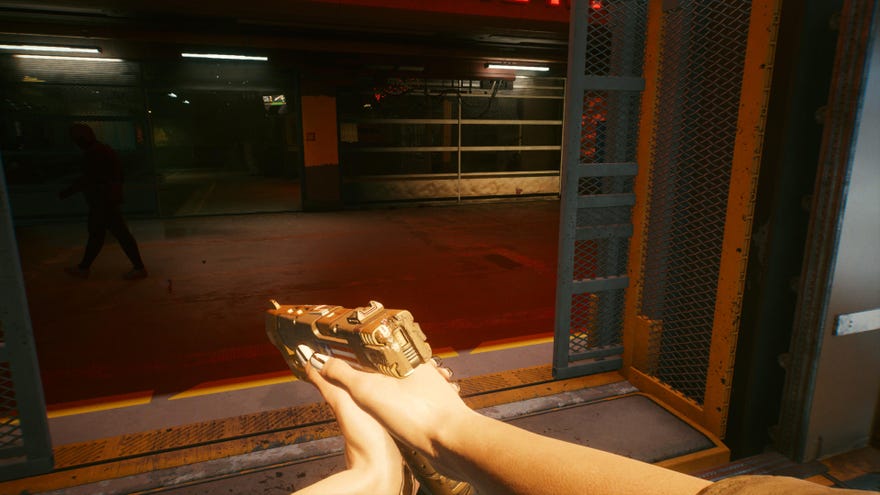
You won’t want to be walking around Night City with your weapon drawn all the time inCyberpunk 2077. Problem is, the game doesn’t really explainhow to holster your weapon. So we’ve decided to explain how to do so in this guide. We’ll take a look at holstering your gun on PC, so that you can be a little less threatening to those around you.
In this Cyberpunk 2077 guide:
How to holster your weapon in Cyberpunk 2077
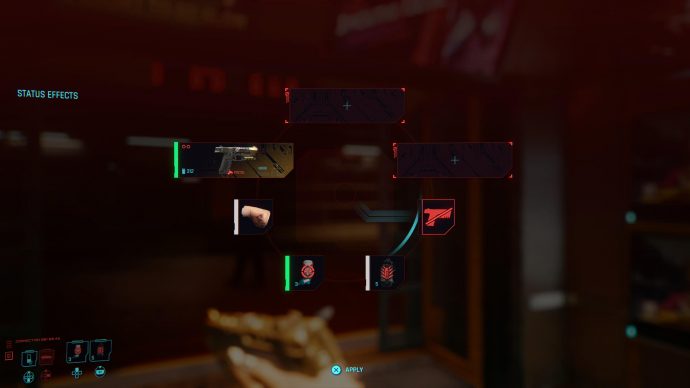
To holster your weapon inCyberpunk 2077you’ll need to hold down the ALT key to bring up the quick-select menu. From here, you can select the red gun icon. This will holster any weapon you are holding. You can see this menu in the screenshot below. There’s also the option to double tap ALT, which will holster weapons faster. For a detailed explanation of the three main weapon types, head to ourCyberpunk 2077 weapons guide.
Putting your gun away on Xbox and PlayStation
For our friends over on the console side of things, just press and hold Y/triangle to bring up the quick-select menu. Press A/X to select the red gun icon. This will put your gun away on consoles. You can also double tap A/X.
Cd Projekt Red Are Making A New Witcher Trilogy, A Sequel To Cyberpunk 2077 & MoreCD Projekt Red recently announced that they’re working on a new Witcher trilogy as well as a sequel to Cyberpunk 2077.Watch on YouTube
Cd Projekt Red Are Making A New Witcher Trilogy, A Sequel To Cyberpunk 2077 & More

Why holster your weapon?
Having a weapon drawn in Cyberpunk 2077 can make characters around you slightly nervous. There’s no real downside to this, except you might get some obscenities thrown your way now and again. I mostly put weapons away to free up the screen a bit, making it easier to see loot and conversation options.
That’s how to put your weapons away in Cyberpunk 2077. For more on the game be sure to check out ourfull soundtrack breakdown. Elsewhere there’s our look atthe characters that you can romance.
