HomeGuidesBiomutant
Biomutant: how to turn off the narrator and adjust narrator line frequencyHere’s how to turn off the Biomutant narrator
Here’s how to turn off the Biomutant narrator
On this page:
Biomutant Is An Unfocused Open World Game | Biomutant ReviewWatch on YouTube
Biomutant Is An Unfocused Open World Game | Biomutant Review

How to turn off the narrator in Biomutant
This doesn’t remove the narrator entirely - you’ll still see the narrator’s lines as subtitles during conversations - but it does mean you’ll never hear the voice again in your playthrough, if that’s your preference.
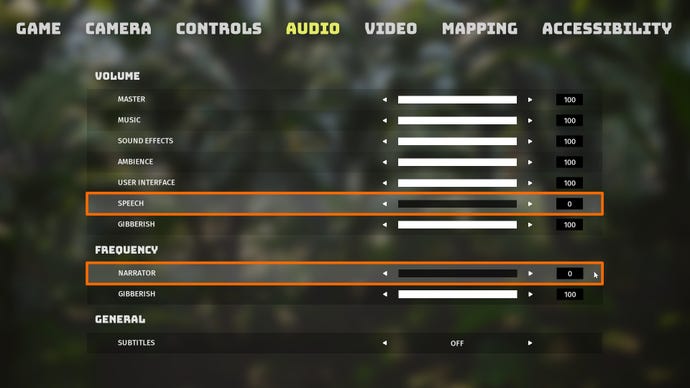
The first slider adjusts the narrator audio volume. The second slider adjusts the frequency of the narrator’s lines (outside of scripted moments and conversations).
How to make the narrator talk less frequently
Another option if the narrator is butting into your story a little too often is to lower the frequency of the narrator’s voice lines. This won’t prevent the narrator from talking during scripted moments or dialogues with other characters, but it will lower or remove the instances where the narrator will occasionally remark on something inconsequential while you’re exploring or fighting.
To make the narrator talk less frequently, go to the Options menu and the “Audio” tab again, and this time set the “Narrator” slider to 0.
You can also repeat either or both of the above methods with the Gibberish (the nonsense-speak that the NPC characters all use) if that’s also been annoying you so far while playing Biomutant.
That wraps up this quick how-to on the Biomutant narrator. While you’re here, why not check out our page on thebest class in Biomutant, or our page onhow to change appearanceduring your playthrough?
