HomeHardwareFeatures
AMD FSR 3 demystified: how the next-gen upscaler could upgrade performance on “any” GPUA guide to telling your frame generation from your latency reduction
A guide to telling your frame generation from your latency reduction
Image credit:AMD
Image credit:AMD
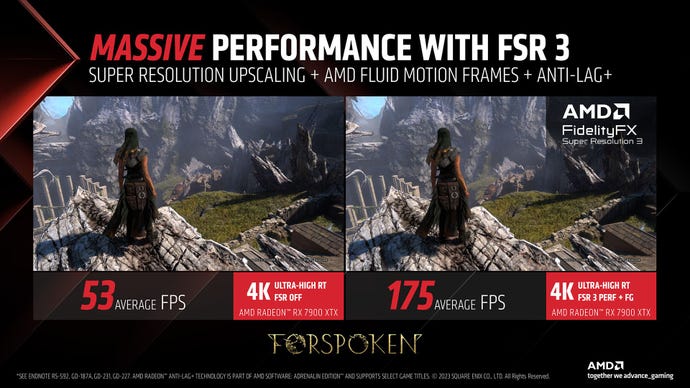
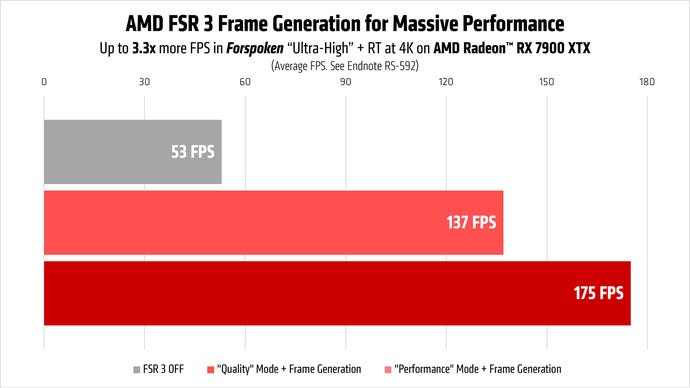
Apologies toGeoffey Kand his GTA 6-loving stage invader, but for me, the torquiest head-turner ofGamescom 2023was not a game but AMD FSR 3. The Radeon gang’s long awaited answer toDLSS 3finally got a proper reveal, showcasing how its frame generation feature – called Fluid Motion Frames – could triple performance in supported games. And, while it was revealed alongside two new GPUs – the Radeon RX 7800 XT and RX 7700 XT – AMD general manager Scott Herkelman suggested that FSR 3 will work “onanygraphics card” once it launches.
The issue of compatibility is more complicated than that, though it’s easy to see the positive impact of a combined upscaler/frame generator that’s far more widely available than DLSS 3. Nvidia’s version, after all, narrows down the GeForce RTX GPU requirement ofDLSSupscaling to merely the latest RTX 40 series. The main catch so far seems to be that FSR 3’s potential benefits are currently snagged up in a net of technical jargon and interconnected Radeon-branded software systems.
So! Let’s see if we can’t do some untangling, Here, in human-friendly terms, is how FSR 3 works – and why it could become quite the big deal for PC gaming performance.
Image credit:AMD
What is FSR 3?
FSR 3, or FidelityFX Super Resolution 3, is primarily aGPU-based upscaler for games. Like previous versions, includingFSR 2andFSR 2.1, it can render a game at a resolution lower than that of your monitor, then instantly convert each rendered frame to native resolution in such a way that makes it looks like it was never lower-res to begin with. Ideally, you can barely tell the difference (if at all), and the lower strain of rendering at a sub-native resolution allows your games to run at higher framerates. FSR, Nvidia DLSS and Intel XeSS are the big three gaming upscalers in widespread use, and all three can produce impressive results.
FSR 3 adds another feature: frame generation, sometimes also known as frame interpolation. While the GPU renders frames in the usual fashion, FSR 3 can analyse data from previous frames and use them to create brand new ones: Fluid Motion Frames, as AMD call them. FSR 3 subsequently slots these in-between the rendered frames, increasing framerates. This process costs almost nothing in general GPU power, so you can potentially get massive frames-per-second boosts with the only hitch being a bit of added input lag.
Image credit:AMD
To put it another way, FSR 3 does largely the same thing as DLSS 3, which was the first gaming upscaler to add frame generation when it launched last year. I’ll want to see FSR 3 in action with my own eyes before declaring it a true step forward, but considering how potent DLSS 3 has proven as a performance aid, the concept is clearly sound.
What’s more, FSR 3 could have a major advantage in its lack of graphics card exclusivity. DLSS might be a better-looking upscaler than FSR, and its own frame generation technique benefits from AI/machine learning smarts that FSR 3 can’t take advantage of. Even so, Fluid Motion Frames don’t have to look perfect, just close enough to ‘real’ rendered frames that your eyes won’t be able to tell the difference. More importantly, because FSR 3 doesn’t need the specific AI hardware of an RTX GPU, it can run on AMD and Nvidia graphics cards alike, making frame generation far more accessible.
Image credit:Rock Paper Shotgun
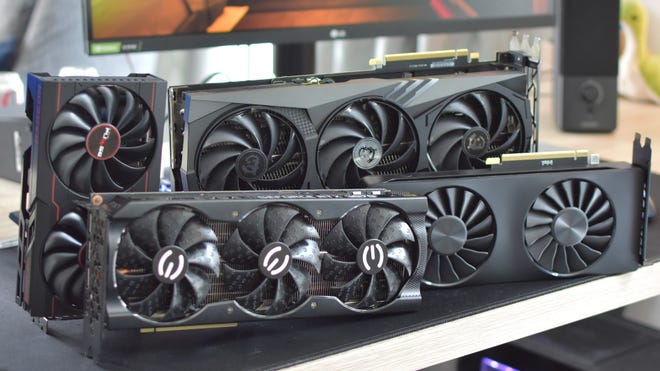
Will FSR 3reallywork with any graphics card, though?
Here’s where things get a bit tricky. During the Gamescom reveal, Herkelman specifically said that AMD “enabled FSR 3 not just to work on Radeon graphics cards, to work on any graphics card.” Very cool, except that further reading suggests that while FSR 3upscalingmight be available to any old GPU, FSR 3frame generationmight need a newer or more powerful card after all.
ThisAMD community postlays out some FSR 3 system requirements of sorts, listing the Radeon RX 5700 and GeForce RTX 20 series (and above) as supporting the full combination of upscaling and frame generation. Older models, including the RX 590 and GTX 10 series, are listed as supporting upscaling only. A note adds that frame generation performance will “depend on the capabilities of your GPU,” and that “on older hardware you may not have an optimal experience and may see little to no improvement in performance.”
Supported and recommended hardware for AMD FSR 3 with upscaling and frame generation:
Supported and recommended hardware for AMD FSR 3 with frame generation only:
The simple version appears thus: you cantryto enable Fluid Motion Frames on older GPUs, including Nvidia’s, but it might not actually help much. The lack of Intel GPUs in these lists is also curious, though given how much the “any graphics card” angle was stressed at Gamescom, I’m willing to chalk that down to AMD simply overlooking a much smaller competitor, rather than suggesting FSR 3 won’t work at all. FSR 2 upscaling is usable just fine on current Intel Arc cards.
Even with the most pessimistic interpretation of these hardware lists, mind, FSR’s frame generation will undoubtedly enjoy a far wider range of compatible GPUs than DLSS 3’s.
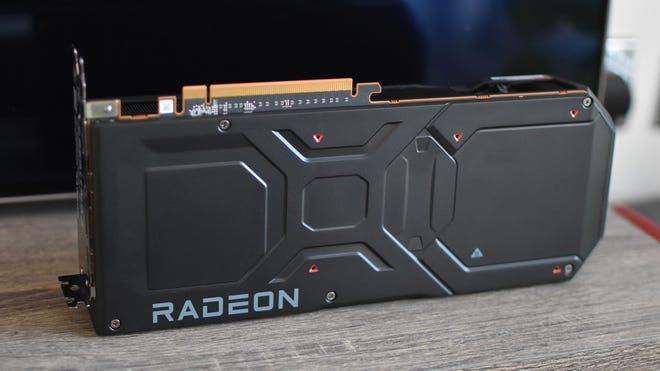
Any other drawbacks to be aware of?
Just as with DLSS 3, FSR 3’s frame generation process will add latency, specifically in the form of input lag. I’ve never found this a truly offputting problem with Nvidia’s take on the tech, but if you do end up using it with a Radeon GPU, you’d be wise to engage its latency reduction tool to minimise any sluggishness. That’s Radeon Anti-Lag on RX 5000/6000 GPUs, and Radeon Anti-Lag+ on the RX 7000 series.
AMD also only recommend engaging Fluid Motion Frames when you can already get at least 60fps without it, incidentally crushing my dreams of FSR 3 being a magic go-faster button for the humbleSteam Deck. This also sounds counterintuitive – surely a PC that gets lower framerates is the most in need of help? – but it does make sense, in terms of reducing how tangible that added latency can be.
As DLSS 3 has already shown, generated frames produce a visual enhancement but don’t make the gamefeelsmoother as well, as they’re essentially being created outside the system that’s also recording your mouse and keyboard inputs. Ensuring a baseline level of tactile control smoothness is therefore still as important as ever, especially as it can help absorb the latency impact of frame generation.
Image credit:AMD

When is FSR 3 releasing, and which games are compatible with it?
FSR 3 doesn’t have a concrete release date yet, though it will be up and running in games sometime this autumn. First up will be a double bill of magic shooters:Immortals of AveumandForspoken, both of which will get updates to add FSR 3 support. Other confirmed games to eith launch and get updates later includeCyberpunk 2077(along with itsPhantom Libertyexpansion),Space Marine II, andLike a Dragon: Infinite Wealth. Here’s the full list of twelve that AMD confirmed at Gamescom:
There’s also the fact that this list only covers games with fully baked-in FSR 3 support. AMD also announced HYPR-RX, a driver-level toolkit that’s set to extend the reach of AMD’s Fluid Motion Frames tech much, much wider.

What is HYPR-RX, and how is it related to FSR 3?
HYPR-RX partly exists to bring them all under a single toggle, accessible via the AMD Software: Adrenalin Edition app. But from early 2024, it will also gain the ability to generate Fluid Motion Frames, making it possible to get frame generation at the driver level – regardless of whether a game has support for full-fat FSR 3. AMD have shown this in action with Fluid Motion Frames giving an almighty framerate push toLies of P, which you’ll note isn’t on the list of FSR 3-compatible games.
Image credit:AMD
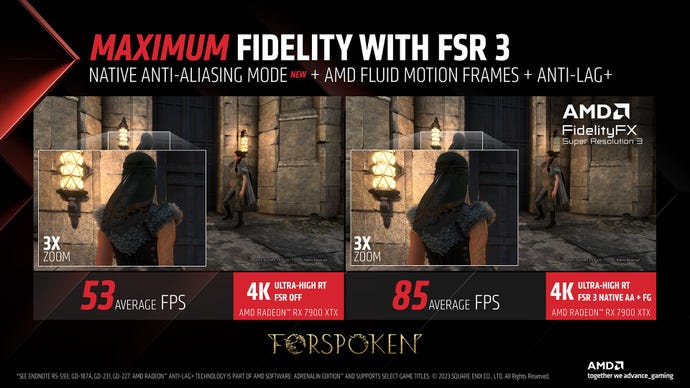
What about Native AA mode?
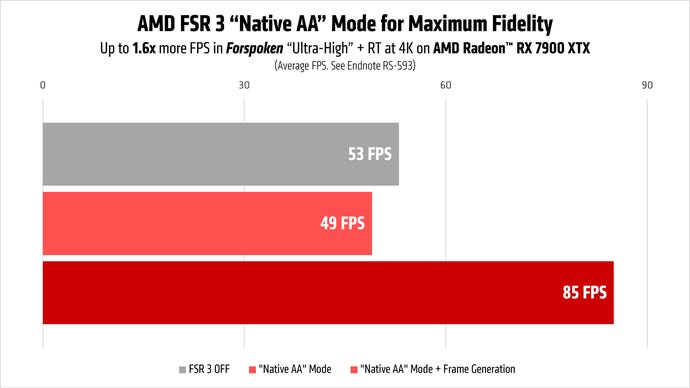
Ah! Here’s another nifty addition. Native AA mode is the FSR 3 version ofNvidia DLAA: it takes the upscaling tool’s integrated anti-aliasing, and applies it a game without the actual upscaling. This can be handy specifically when you’re already getting good performance, but don’t quite like the look of the game’s own anti-aliasing. Well, TAA isn’t for everyone.
Like FSR 3 as a whole, developers will still need to manually implement Native AA, though since it’s also compatible with Fluid Motion Frames it could be very well suited for playing at 1080p. This resolution is usually too low for upscalers to produce a sufficiently sharp image, but Native AA should allow you to get the performance benefit of FSR 3 frame generation without having to make that tradeoff to overall quality.
Image credit:AMD