HomeNewsDoom
Amazing new Doom mod replaces enemy sprites with voxel modelsVoxel Doom looks just like how I remember Doom
Voxel Doom looks just like how I remember Doom
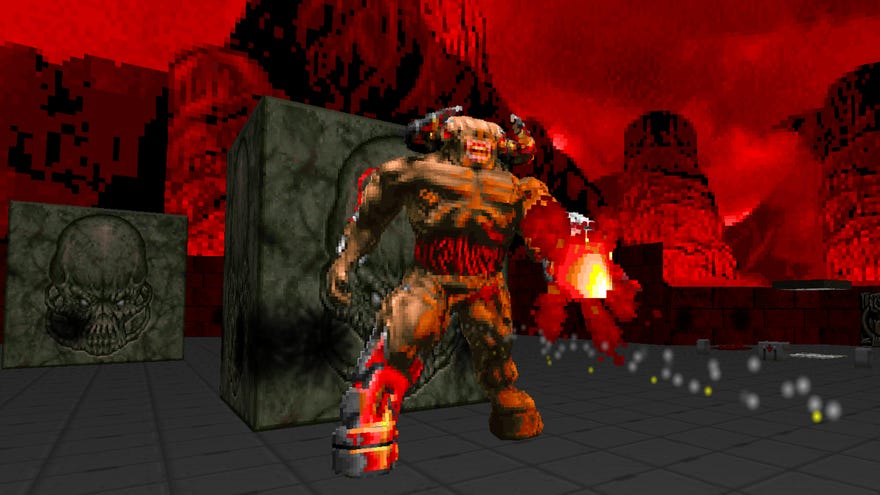
Amazing new Doom mod Voxel Doom replaces 2D sprites with voxel modelsIt… took me a while to remember how to navigate Mt ErebusWatch on YouTube
Amazing new Doom mod Voxel Doom replaces 2D sprites with voxel models

The mod, Voxel Doom replaces the sprites for monsters, weapon pick-ups, items, and decorative props with 3D voxel versions. No more monsters snapping between directions or props rotating to face you, it’s full fancy 3D. The mod only recreates Doom 1 monsters right now, but creator Daniel “Cheello” Peterson says “Doom 2 monsters will be completed in the very near future.”
Voxel Doom looks pretty great! Things look like the originals, only now they’re solid objects I can see from all angles, not just the handful of sprite angles. And the shower of mid-air gibs is amazing. Enemies can look a touch weird up close, especially anything with an open mouth (poor Pinky in particular), but once you’re even a couple metres away it’s just grand. It could perhaps look more natural with a few more frames or little tweaks, but I really admire Cheello’s restraint to not do that.
Modders have made polygonal 3D models replacing Doom’s sprites before, and they’ve never looked right to me. 3D models in Doom are weird. This voxel mod, I think, might actually be how I’d prefer playing Doom going forward. Huh! The only other makeover mod I feel this way about isthe remarkable Resident Evil 4 HD Project. Mods which make the game look how I had remembered them and don’t compromise their style.
I have enjoyed Cheello’s timelapse videos showing the process of recreating individual sprite frames in voxels:
Voxel Time Lapse - Cyberdemon Pain FrameWatch on YouTube
Voxel Time Lapse - Cyberdemon Pain Frame

To admire the voxels yourself, you will need: 1) a copy of Doom; 2) the newest version ofGZDoom, a fan-updated engine; 3) Voxel Doomfrom Mod DB. Unzip GZDoom, copy the fileDoom.wadfrom your Doom directory into GZDoom’s directory, then whack Voxel Doom’scheello_voxels.zipin the same place. To run it, simply drag the zip file on top of the GZDoom executable, and away you go.
GZDoom is the officially required engine port, and I don’t know if you can make it work on other ports. If you have opinions on this subject, I trust you know enough about it to experiment for yourself.
Circling around the voxellated gibs did remind ofDoomdream, a wee free walking simulator recreating dreams after playing too much Doom.Haven’t thought of that in a while. Nice little game.
